2.3.5 安裝 Redmine
下載 Redmine 並解壓 Redmine
$ wget http://www.redmine.org/releases/redmine-3.3.6.tar.gz
$ tar zxvf redmine-3.3.6.tar.gz
重新命名
$ mv redmine-3.3.6 redmine
移動 Redmine 到安裝路徑
$ sudo mv redmine /opt/redmine
複製 Redmine 設定檔
$ cd /opt/redmine
$ cp config/configuration.yml.example config/configuration.yml
$ cp config/database.yml.example config/database.yml
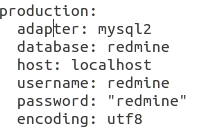
修改 Redmine MySQL 設定檔 config/database.yml
根據自己配置修改
安裝及設定 Bundler
$ gem install bundler --no-rdoc --no-ri
$ sudo apt-get install libmagickwand-dev ruby-mysql libmysqlclient-dev
$ gem install mysql2
$ cd /opt/redmine

bundler
$ gem uninstall bundler -v ">= 2.0"
$ gem install bundler -v "< 2.0"


$ bundle install --without development test postgresql sqlite
產生 session store secret ( 必須產生一組 session token, why?)
$ rake generate_secret_token
建立 Redmine 資料表
DROP DATABASE IF EXISTS redmine;
CREATE DATABASE redmine CHARACTER SET utf8;
CREATE USER 'redmine'@'localhost' IDENTIFIED BY 'redmine';
GRANT ALL PRIVILEGES ON redmine.* TO 'redmine'@'localhost';
產生並建立 Redmine 資料庫
$ cd /opt/redmine
$ RAILS_ENV=production rake db:migrate
產生 Redmine 預設組態檔, 並指定使用的語系 ( 預設是英文)
$ cd /opt/redmine
$ RAILS_ENV=production rake redmine:load_default_data
配置語言
測試 Redmine
$ cd /opt/redmine
$ ruby bin/rails server webrick -e production
位置
預設的管理者帳密為
帳號 : admin
密碼 : admin
備註 : 這邊做法是用 rails server 啟動 redmine